
Email and Telephone Validation: Configuring Phone Validation

Phone Validation Settings

Telephone numbers are validated according to different rules for different countries. If a telephone number contains a full international code, the country will be determined from the number itself. If no international dialing code is specified, the country entered in the Default Telephone Validation Country Code setting is assumed. This defaults to 44. If you are outside of the UK you will want to change this to the international dialing code from your country (e.g. 1 for US, 33 for France etc.) so that telephone numbers are validated according to the rules for the correct country.
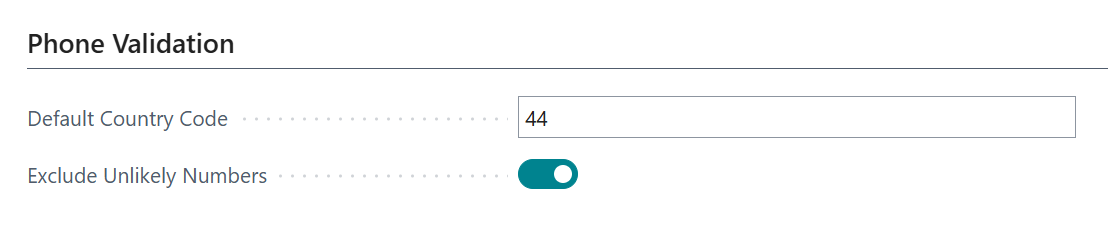
 

Enable Exclude Unlikely Numbers to have the service perform an additional regex check and invalidate any unlikely numbers even if they are technically valid, such as 07000000000 or 01234567890.

Once your global settings are set up, you need to configure column by column mappings to store the validation results. Find out more here

Phone Number Standardization

Phone number standardization can format phone numbers to improve your data quality, making it easier to analyse your data.
Enabling this will expose some options to customize how to format phone numbers.
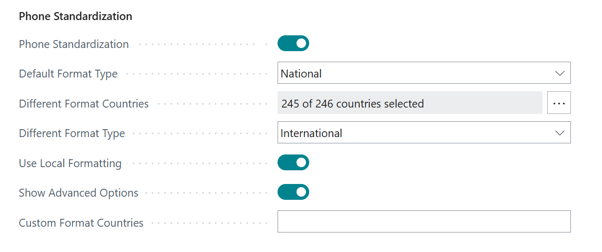
More information on these options:

Default Format Type

The format of the returned phone number. This can be one of the following values:

  • International – the number is presented back with full international dialling code
  • National – the number is presented back without the international dialling code but with the full area code

Any telephone numbers for these countries will be formatted using the DifferentFormatType format instead of the DefaultFormatType. If this is not specified it will default to the same value as the defaultCountry parameter. To format all telephone numbers according to the DefaultFormatType regardless of country, do not select any countries. If a country does not exist in the list of options, a new country can be added by typing the country code (without leading + or 00) and clicking “Add”.

The format the telephone number should be returned in if it is from a country listed in DifferentFormatCountries. This can be one of the same set of values as DefaultFormatType.

The TelephoneNumber field in the result will be formatted according to our standard country-specific rules. This option allows you to override those formats. Custom formats are specified as a semi-colon separated list of <countrycode>=<format>, where <countrycode> is the international dialling code and <format> is the format to use for telephone numbers in that country.

Formats are specified using the following special characters. Examples show the result of the formatting character based on the input telephone number +441513554555 extension 1234.

CharacterDescriptionExample
0The next available digit of the telephone number. This will not include the international dialling code for the country, or the trunk dialling prefix1
iThe international dialling code for the country44
tThe trunk dialling prefix required for long distance calls within the country.0
aThe area code of the telepone number. This will not include the trunk dialling prefix151
lThe local part of the telephone number3554555
xThe extension number1234

Any other characters will be treated as literal strings. The backslash character is used as an escape character, so \i will output i and \\ will output \.

If there are more numbers in the telephone number than are output by the specified format string, the additional numbers will be appended to the result to ensure no data is lost.

Indicates if telephone numbers should be formatted according to the country-specific rules for its particular country with spaces, punctuation etc. If this is set to false, numbers are formatted according to ITU international standard formatting.

Join the Conversation

Receive the latest news, views and hot topics directly in your inbox! Sign up below

Follow us on social media

Data8
Privacy Overview

This website uses cookies so that we can provide you with the best user experience possible. Cookie information is stored in your browser and performs functions such as recognising you when you return to our website and helping our team to understand which sections of the website you find most interesting and useful.