
- Open Business Central and use search to find the “Postcode Provider Configuration” page.
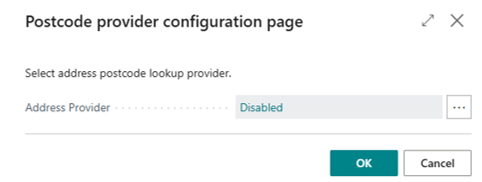
- Select Data8 from the list of available postcode lookup services.
- Enter the server-side API key.
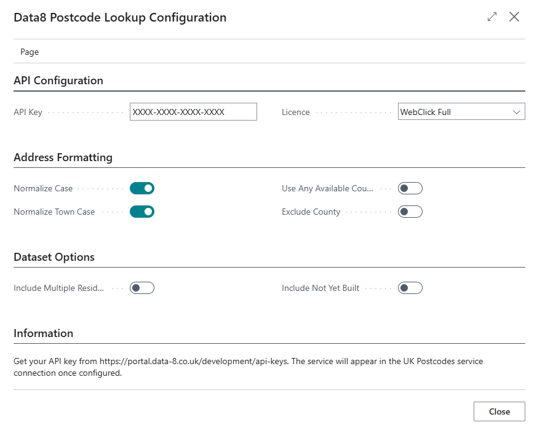
- As the Royal Mail PAF database can be licensed in multiple ways, the option Licence indicates under which license you are accessing the data. This must match the variant you have a license or credits for – if you are unsure which option to choose, you can check what services you have available here or please contact your account manager.
- There are some additional options available. These are:
Address Formatting
Normalize Case: Enable this to convert all text in the address except the town name to proper case. If disabled, then the address will be returned in all caps.
Normalize Town Case: Enable this convert the town name to proper case. If disabled the town will in all caps.
Use Any Available County: Uses any available county to populate the formatted address, not just the postal county.
Exclude County: Excludes the county, if any, from the formatted address.
Exclude Organisation: Excludes the organisation from the first line of the address, if any.
Dataset OptionsNote: Each additional dataset requires additional licensing. If you attempt to use a dataset which your account is not licensed for an error will be returned. Please speak to your account manager to enable additional datasets.
Include Multiple Residency: Includes addresses from the UK Multiple Residency database, e.g. multiple flats behind a single letter box, university halls of residence.
Include Not Yet Built: Includes addresses from the UK Not Yet Built database, e.g. houses currently being developed. - Click Close after you have configured all these settings.