
- 5 min read
- August 2026
Why "Exact Match" Isn't Enough: Inside Duplicare's Advanced Fuzzy Matching
Deryn Crighton-Smith
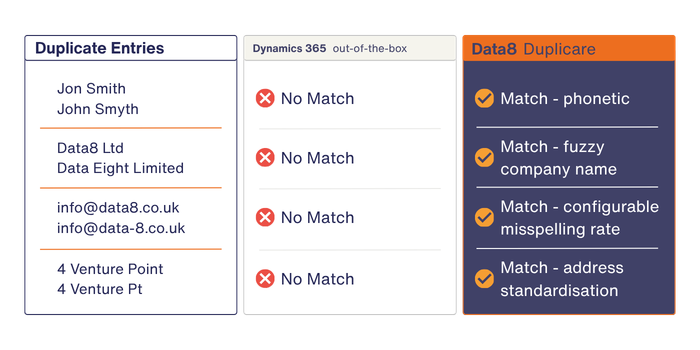
“Jon Smith.” “John Smyth.” Same person. Two records. And if you’re running native Dynamics 365 duplicate detection, they’ll sail past each other without a flicker of recognition.
That’s the problem with exact-match logic: it only catches the duplicates that were never really hiding. Real-world CRM data is messier – typos from web forms, “Ltd” vs “Limited,” nicknames, missing middle initials, a company name spelled three different ways by three different sales reps. Native detection sees these as unrelated records. Duplicare sees them for what they are.
The gap in native exact-match detection
Dynamics 365’s built-in duplicate detection compares records field-by-field, looking for identical values. It’s free, it’s built in, and it works – right up until your data isn’t perfectly clean, which is to say, almost never.
Here’s where it falls short:
- No fuzzy logic – “Data8 Ltd” and “Data Eight Limited” won’t match, even though a human spots the duplicate instantly.
- Capped at five rules per entity – You can’t build out multiple matching strategies for different scenarios.
- Three entities only – Accounts, contacts, leads – nothing else. Custom entities and industry-specific tables are invisible to it.
- Two-record merges – Found ten duplicates of the same account? You’re merging them two at a time, manually, one after another.
None of this is a criticism of Dynamics 365. It’s simply not what the native tool was built for. It’s a safety net for obvious matches, not a deduplication engine.
Phonetic, typo-tolerant, and configurable matching
Duplicare closes that gap with three layers of fuzzy logic working together:
- Phonetic matching catches names that sound alike but are spelled differently, e.g. “Stephen” and “Steven,” “Catherine” and “Kathryn.” Native rules have no concept of “sounds like.”
- Typo tolerance (configured through a misspelling rate) lets you set how many characters two values are allowed to differ by before still counting as a match. Set a 20% misspelling rate on a 10-character field, and values up to two characters apart will match. This is what catches “Micrsoft” against “Microsoft” without you writing a single rule for that specific typo.
- Configurable fuzzy matching extends to company names and addresses, too. “Acme Corp,” “ACME Corporation Ltd,” and “Acme Corp.” all resolve to the same underlying business. Addresses written five different ways still point to one location once they’re standardised.
Compare the two approaches side by side:
Built for enterprise-scale data quality
Catching near-matches is one thing. Managing that at scale, across a whole CRM estate, is another – this is where Duplicare’s enterprise features earn their keep.
Configurable scoring thresholds
Duplicare’s Dedupe+ Rules let you combine multiple matching conditions with And/Or groupings, then assign each one a score. A record only counts as a duplicate once it crosses your chosen threshold. That means you can run tight, high-confidence rules for automatic merging alongside looser rules that simply flag records for a human to review – all without writing a single line of code.
Cross-entity detection
Native detection stops at accounts, contacts, and leads. Duplicare doesn’t. It runs across any standard or custom entity in your environment, so if you’re tracking memberships, opportunities, cases or an industry-specific table that doesn’t exist anywhere else in Dynamics, duplicates there get caught too.
AI-assisted matching
Building sophisticated matching rules used to mean understanding scoring logic and field mapping in detail. Duplicare now lets you describe what you want in plain language to a built-in AI agent, which creates, refines and explains the rule for you – cutting the time it takes to get from “we have a duplicates problem” to “it’s solved.”
Support for custom entities
Whatever you’ve built on top of Dynamics 365, Duplicare can deduplicate it. There’s no ceiling on the number of Dedupe+ Rules you create, unlike native detection’s hard limit of five published rules per entity.
What this looks like at scale
A CRM with duplicate records doesn’t just look messy, it costs time. Sales reps call the same prospect twice from different records. Marketing emails the same contact through two different entries, damaging deliverability. Reports overstate pipeline because one opportunity shows up three times. And if you’re layering AI tools like Copilot on top of fragmented profiles, those tools inherit the fragmentation – recommendations get less reliable, not more.
Data8 customers using Duplicare have reported time savings of up to 90% on deduplication work, with some reclaiming as much as 24 hours in a single week that would otherwise go into manual two-at-a-time merging. Multiply that across a growing CRM and the case for advanced matching writes itself.
Duplicare has been doing this since 2005, won the Queen’s Award for Enterprise and Innovation for its work in this space in 2022, and is trusted by 1,000+ companies with 5-star ratings on G2.
The bottom line
Exact-match detection answers a narrow question: are these two values identical? Fuzzy matching answers the question you actually care about: are these two records the same real-world person or business? Duplicare’s phonetic, typo-tolerant and configurable matching – backed by scoring thresholds, cross-entity coverage, and AI-assisted rule building – is built to answer that question at enterprise scale, across every entity in your CRM, not just the three Microsoft ships by default.
If your data comes from more than one source (web forms, imports, integrations) you already have duplicates that exact matching can’t see. Start a free 14-day trial and run Duplicare against your own records to see what it finds.