
- 8 min read
- April 2026
Data8 Duplicare vs Dynamics 365 Duplicate Rules
Matt Beard
Keeping your Dynamics 365 CRM free of duplicate records is one of those tasks that sounds simple until you try it. Microsoft includes basic duplicate detection rules out of the box, but many CRM managers find those rules fall short when matching gets complicated. That’s where a dedicated Dynamics 365 deduplication tool like Data8 Duplicare comes in.
This article breaks down the differences between Data8 Duplicare and the native Dynamics 365 duplicate detection rules. You’ll learn what each option can do, where they differ on matching accuracy and merge control, and which scenarios favour one approach over the other.
Key Takeaways: Data8 Duplicare vs Dynamics 365 Duplicate Rules
- Data8 Duplicare offers advanced fuzzy matching including phonetic name matching, address matching, and domain matching that native rules cannot replicate.
- Dynamics 365 native duplicate detection works for basic exact-match scenarios on accounts, contacts, and leads at no extra cost.
- Data8 Duplicare lets you detect and merge records across any standard or custom entity, not just the core three tables.
- Native rules alert you to potential matches but lack automated merge workflows and multi-record merging.
- For organisations preparing CRM data for AI and automation, Data8 delivers the accuracy needed for reliable results.
Data8 Duplicare vs Dynamics 365 Duplicate Rules: Overview
What is Data8 Duplicare?
Data8 Duplicare is a purpose-built deduplication solution designed specifically for Microsoft Dynamics 365 and the Power Platform. It gives you real-time duplicate detection as records are created, batch-based detection for cleaning existing data, and advanced merge workflows that consolidate related records, activities, and child data into a single trusted profile.
Data8 Duplicare key features
- Fuzzy matching algorithms: Detect records with misspellings, nicknames, and abbreviations using phonetic, address, and company name matching.
- Dedupe+ Rules: Build complex matching logic with scoring, And/Or groupings, and cross-field checks beyond exact matches.
- Multi-record merge: Merge more than two records at once while preserving activities, notes, and relationships.
- Any entity support: Run duplicate detection on standard and custom entities, not just accounts, contacts, and leads.
- AI-assisted rule building: Chat with an AI agent to create, refine, and explain your matching rules in plain language.
Data8 Duplicare pros and cons
- Data8 Duplicare gives you fuzzy matching accuracy that catches variations native rules miss entirely.
- You can merge large groups of related records in one action instead of handling them two at a time.
- The solution respects your existing security roles so it never exposes data a user shouldn't see.
- Initial rule configuration takes time, though the AI assistant simplifies the process significantly.
- Merging thousands of records in bulk can take a while to process, but runs in the background without blocking your work.
- You need to add a column and script to your forms to enable real-time detection, which is documented step-by-step.
What is Dynamics 365 native duplicate detection?
Dynamics 365 includes built-in duplicate detection rules that compare records based on match codes generated from specified fields. When you create or update a record, the system checks it against published rules and shows a warning dialog if a potential match is found. Administrators can also schedule bulk duplicate detection jobs to scan the database for matches.
Dynamics 365 native duplicate detection key features
- Rules for accounts, contacts, and leads: Pre-configured rules match on fields like email, first name, and last name.
- Real-time warnings: A dialog appears when saving a record that matches an existing entry, letting the user review before proceeding.
- Bulk detection jobs: Schedule jobs to scan your database and generate lists of potential matches for manual review.
- Customisable rule conditions: Create rules that compare up to five fields using exact match criteria.
- No additional licensing: Included with your Dynamics 365 subscription at no extra charge.
Dynamics 365 native duplicate detection pros and cons
- Included with Dynamics 365 so there are no additional costs or installations required.
- Works on tablets as part of the mobile experience for on-the-go detection.
- Rules are simple to set up for basic exact-match scenarios on the main CRM tables.
- Limited to a maximum of five published rules per entity type at any one time.
- Does not support custom entities—only works with accounts, contacts, and leads.
- Lacks fuzzy matching, so "Data8 Ltd" and "Data Eight Limited" won't match.
Data8 Duplicare vs Dynamics 365 Duplicate Rules: In-depth comparison
Matching accuracy and fuzzy logic
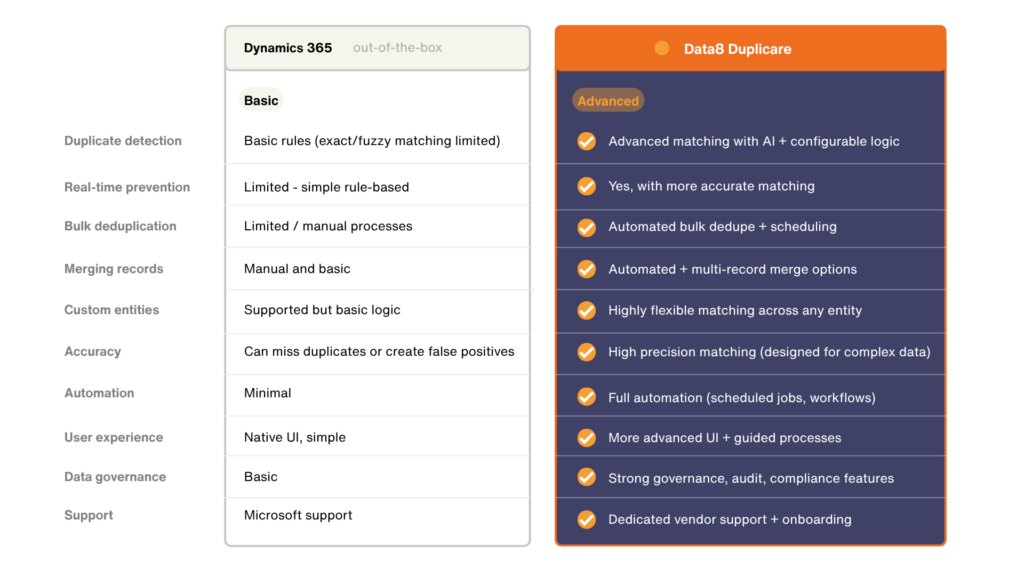
Data8 Duplicare supports phonetic matching, company name normalisation, and address standardisation. This means “Jon Smith” can match “John Smyth” and “Acme Corp” can match “ACME Corporation Ltd.” Native Dynamics 365 rules rely on exact field comparisons, so any variation in spelling, abbreviation, or formatting prevents a match.
If your CRM receives data from multiple sources, web forms, imports, integrations, you’ll see variations that only fuzzy matching catches reliably.
Entity coverage
Native duplicate detection in Dynamics 365 works exclusively with accounts, contacts, and leads. Data8 Duplicare extends detection and merging to any standard or custom entity in your environment. This matters if you track products, opportunities, cases, or industry-specific tables where duplicates cause problems.
For CRM managers dealing with custom data models, the ability to deduplicate any table removes a significant gap in native capabilities.
Merge workflow and automation
When Dynamics 365 detects a potential match, it shows a warning—but the actual merge process is manual and limited to two records at a time. Data8 Duplicare offers multi-record merging, merge rules that define how field values combine, and the ability to process large batches in the background.
This reduces the time your team spends clicking through merge dialogs and ensures consistent results based on the rules you define.
Rule complexity and scoring
Data8 Duplicare allows you to combine matching conditions using And/Or groupings and assign scores to each rule. A record only counts as a match when it crosses your chosen threshold. Native rules support up to five simple conditions with no scoring or weighted logic.
Scoring helps you tune detection sensitivity—tighter rules for high-confidence merges, looser rules for flagging records that need human review.
Data governance outcomes
Clean, unified records support accurate reporting, reliable marketing segmentation, and trustworthy AI insights. Data8 Duplicare helps you build a single customer view by consolidating fragmented records. Native detection can prevent some obvious matches at entry but lacks the depth to clean historical data or handle edge cases.
With AI copilots and automation increasingly common in CRM, the foundation of accurate data becomes essential rather than optional.
How do you choose between native duplicate detection and a dedicated tool?
Native Dynamics 365 duplicate detection works well if your matching requirements are straightforward. If you only need to catch obvious matches—like two contacts with the same email address—and your team is comfortable merging records manually, the built-in rules may be enough.
You’ll likely need a dedicated deduplication tool like Data8 Duplicare when:
- Your data comes from multiple sources with inconsistent formatting
- You work with custom entities that native detection doesn’t cover
- You need to clean historical data in bulk rather than one record at a time
- Spelling variations, nicknames, and abbreviations cause false negatives
- You’re preparing your CRM for AI-driven workflows that require unified records
The right choice depends on your data complexity and how much time your team can invest in manual review.
What happens to your CRM data when you skip deduplication?
Ignoring duplicate records creates problems that compound over time. Sales reps call the same prospect twice from different records. Marketing sends redundant emails that damage your sender reputation. Reports show inflated pipeline numbers because the same opportunity appears multiple times.
According to research from Ecosire, organisations lose significant productivity to bad CRM data, with sales teams wasting time researching contacts manually and chasing outdated leads. These costs add up quickly when multiplied across your team.
For organisations using AI features like Microsoft Copilot, fragmented customer profiles produce unreliable recommendations and insights. A unified record gives AI the complete context it needs to surface genuinely useful suggestions.
Why Data8 Duplicare is the best choice for Dynamics 365 data quality
Data8 Duplicare goes beyond simple duplicate alerts to deliver a complete deduplication workflow. The solution handles detection, prevention, merging, and ongoing maintenance in one package designed specifically for Dynamics 365.
Unlike native rules that leave you clicking through merge dialogs one pair at a time, Data8 Duplicare processes large volumes in the background while preserving activities, relationships, and audit trails. The fuzzy matching algorithms catch variations that exact matches miss, and you can apply detection rules to any entity in your environment.
If you’re ready to take control of your CRM data quality, Data8 Duplicare is available with a free trial from the Microsoft AppSource marketplace or via our registration page here. You can test the matching accuracy with your own records and see how it performs against your specific data challenges.
FAQs: Data8 Duplicare vs Dynamics 365 Duplicate Rules
Can Dynamics 365 detect duplicates on custom entities?
No, native Dynamics 365 duplicate detection only works on accounts, contacts, and leads. If you need to deduplicate custom entities like products, memberships, or industry-specific tables, you’ll need a solution like Data8 Duplicare that supports any entity type.
What is fuzzy matching in CRM deduplication?
Fuzzy matching identifies records that represent the same entity even when the data differs slightly. For example, Data8 Duplicare can match “Jon” with “John” or “Acme Ltd” with “Acme Limited” using phonetic algorithms and standardisation rules that go beyond exact text comparisons.
Why does clean CRM data matter for AI and automation?
AI tools and automated workflows rely on accurate, unified records to produce reliable results. If your CRM contains fragmented customer profiles, AI recommendations become inconsistent and automations may trigger incorrectly. Data8 Duplicare helps you build the clean data foundation that modern AI features require.
How many duplicate detection rules can you publish in Dynamics 365?
Dynamics 365 limits you to five published duplicate detection rules per entity type at any one time. This can be restrictive if you need multiple matching strategies for different scenarios. Data8 Duplicare has no such limit on the number of Dedupe+ Rules you can create.
If your delivery routes include new housing developments, confirm whether your chosen provider includes this data.
Does Data8 Duplicare merge records automatically?
Data8 Duplicare offers configurable merge workflows where you define how fields combine and which record becomes the master. You can set up rules to process merges automatically based on your criteria, or review matches manually before merging. The choice is yours.