
- 4 min read
- July 2026
Your Guide to Better CRM Data Quality
Rebekah Harkin
Why CRM data quality actually matters
Every CRM starts clean. Then people move house, change jobs, switch phone numbers, and companies merge, rebrand or close down. None of that shows up automatically in your database – it just quietly goes stale.
Gartner’s research puts the average cost of poor data quality at around $12.9 million (roughly £10.4 million) per organisation, per year – through wasted marketing spend, missed sales opportunities and time lost to manual corrections. And it compounds: a database of 10,000 contacts can expect around 3,000 outdated records in year one alone, with a further 2,100 becoming outdated the year after, on top of what was already stale.
The good news is that none of this is inevitable. It just needs to be checked, measured and actively managed, which is exactly what the rest of this guide walks you through.
- 30% – average annual data decay rate
- £10.4m – average annual cost of poor data quality (Source: Gartner)
- 2,100+ – extra records that go stale in year two of a 10,000-record database
30%
average annual CRM data decay rate
£10.4m
average annual cost of poor data quality [Gartner]
7
areas to check in this guide
What "good" data quality actually look like
Data quality isn’t a single yes/no property – it’s usually broken down into six dimensions. A record can be valid but incomplete, or unique but out of date. Knowing which dimension is failing tells you which fix to reach for.
Accuracy
- The data correctly reflects reality
- Wrong job title, old surname, mistyped postcode
Completeness
- Required fields are actually filled in
- Missing phone number, blank address line
Consistency
- The same fact is recorded the same way everywhere
- "Ltd" vs "Limited", different formats for one phone number
Validity
- Data conforms to the expected format or rule set
- An email with no @ symbol, an invalid sort code
Uniqueness
- Each real-world entity appears only once
- The same contact stored three times under slightly different details
Timeliness
- The data is current, not stale
- An address for someone who moved two years ago
How to check your CRM data quality: your free data quality audit
Data quality isn’t a single yes/no property – it’s usually broken down into six dimensions. A record can be valid but incomplete, or unique but out of date. Knowing which dimension is failing tells you which fix to reach for.
1. Prepare your data
Select the data you would like to analyse and create an extract from your system. We accept many formats, with csv files being the most popular.
- File formats accepted: CSV, Excel, Access, Tab Delimited, Fixed field sizes
- Watch out for multiple sheets in your workbook
- Do not use password protected Excel documents
- Include an identifier column at the beginning of each record to help you later on

2. Upload your data for audit
Once you have registered, select Dashboard > Cleansing > Submit a file
Watch the step-by-step video on how to upload a file, map your file, and selecting the appropriate options to suit your needs.
3. Review your free data quality audit
Your audit will tell you all about the various services available to enhance your data.
Your dedicated Client Success manager will then contact you to talk you through your findings and answer any questions you may have about the results.

4. Purchase Results
You can purchase some, or all, of the data cleansing services highlighted in the audit. Our Client Success Team can help, alternatively the video provides a guide on purchasing the results via our online portal.
Want the full picture? not just a sample?
Data8 offers a free data quality audit of your CRM data .Showing your exactly where decay is costing you.
Data Quality FAQs
What is CRM data quality?
CRM data quality is how accurate, complete, consistent, valid, unique and up to date the records in your CRM are. High-quality CRM data means every contact, account and address reflects reality closely enough to be trusted for sales, marketing and reporting.
How do I check the data quality of my CRM?
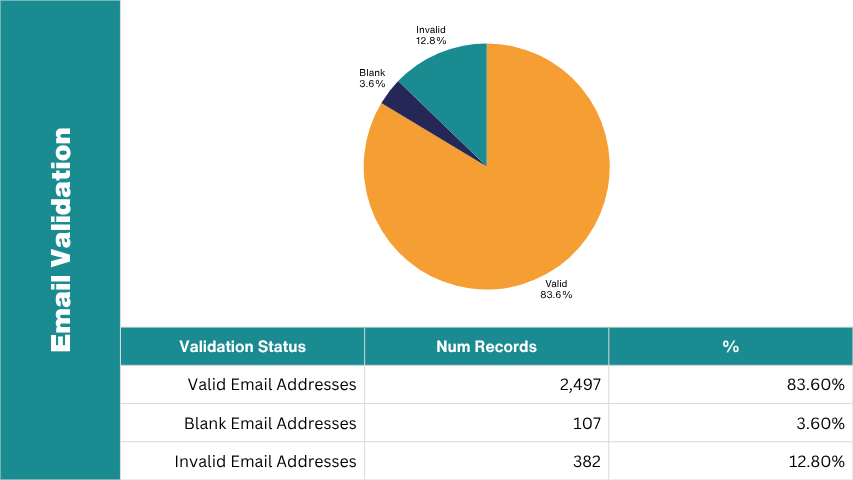
Take a sample of records and check them against seven areas: duplicates, address validity, phone validity, email validity, bank details, business/firmographic accuracy, and whether records are actively maintained. The percentage of records that fail each check gives you a data quality score for that area.
How often should CRM data be cleaned?
CRM data decays at roughly 30% per year on average, so most organisations should audit and cleanse at least twice a year, with real-time validation at the point of entry running continuously in between.
What is data decay?
Data decay is the natural process by which stored contact and business data becomes outdated over time, as people move house, change jobs, switch numbers, or companies close and merge. It starts depreciating from the moment it’s captured.
What's the difference between data cleansing and data validation?
Validation checks data as it enters your CRM, stopping bad data before it’s stored. Cleansing is the process of finding and correcting inaccurate, outdated or duplicate data that’s already in your database. Most data quality strategies need both.