
- 5 min read
- November 2026
Duplicare November 2026 Update: Deduplication in Dynamics 365 Just Got Smarter
Matt Beard
Duplicare is Data8’s award-winning data deduplication solution for Microsoft Dynamics 365. Our latest update introduces a range of useful and exciting changes designed to help you and your teams remove and merge duplicates more efficiently.
What's New in Duplicare?
| Update | What It Does | Why It Helps |
|---|---|---|
| Company-name standardisation preview | Shows what a company name will look like after standardisation rules are applied | You see the resulting value before you rely on it for matching |
| Redesigned merge window header | Makes it easier to choose the master record, understand recalculated values and use Select All | It is clearer which record you keep, and which values survive |
How Does the Company-Name Standardisation Preview Work?
Users can now preview what a company name will look like after their standardisation rules have been applied. You can see how names will be interpreted before deduplication takes place.
For example, ABC Solutions Limited becomes ABC Solutions.
N.B. The actual transformation depends on the standardisation rules in use.
Why Preview Standardisation Before Matching?
Company names are one of the most common sources of duplicates in a CRM. The same organisation can appear with and without a suffix such as “Limited”, or with small variations in punctuation and spacing. Standardising names before matching helps Duplicare compare like with like.
The preview gives you confidence. Instead of waiting to see how a rule behaves after matching runs, you can check the resulting value first and decide whether it suits your data.
How Have We Improved User Experience in the Duplicare Merge Window?
The header area of the merge window has been redesigned to make three common tasks easier:
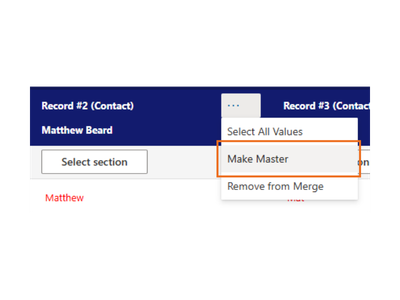
Choosing the Master Record
Pick the record you want to keep with less guesswork.
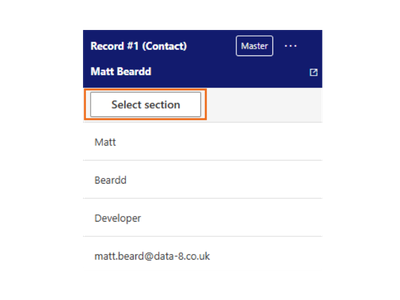
Using Select All
Apply a selection across fields faster.
Due to this change, when you merge duplicates, it will be clearer which record you’re keeping, and which values will survive. That means fewer second-guesses during a merge and less time spent on manual checking.
Duplicates in Dynamics 365 Causing a CRM Nightmare? Try Duplicare for Free
Explore our award-winning native deduplication solution for Microsoft Dynamics 365, built to identify, prevent and resolve duplicates with speed and accuracy.
Duplicare November 2026 Update FAQs
What is company-name standardisation in Duplicare?
Company-name standardisation in Duplicare applies your standardisation rules to company names in Dynamics 365 before matching, so different spellings of the same organisation are compared consistently. For example, ABC Solutions Limited becomes ABC Solutions. The November 2026 update adds a preview, so you can see the resulting name before you rely on it for matching. The actual result depends on the rules you have set.
Does the standardisation preview change my Dynamics 365 records?
The Duplicare preview shows what a company name will look like once your standardisation rules are applied, so you can check the result before deduplication runs. When a Dedupe+ rule uses Fuzzy Company Name Match, Duplicare automatically creates a standardised company name column, which can take a short while to initialise.
Which Dynamics 365 tables can Duplicare deduplicate?
Duplicare can find and merge duplicates in any standard or custom table in a Dynamics 365 environment, including accounts, contacts, leads and custom entities. Built-in Dynamics 365 duplicate detection covers only accounts, contacts and leads. Tables such as memberships, products or industry-specific custom tables need a tool like Duplicare.
How does Duplicare differ from built-in Dynamics 365 duplicate detection?
Built-in Dynamics 365 duplicate detection relies on exact field comparisons, covers accounts, contacts and leads, and allows five published rules per entity type. Duplicare adds fuzzy matching for names, company names and addresses, so variants such as “Data8 Ltd” and “Data 8 Limited” can match. It also works on any table and merges more than two records at once. See the full Duplicare vs Dynamics 365 duplicate rules comparison.
Can Duplicare merge more than two duplicate records at once?
Yes. Duplicare can merge more than two records in a single merge, and the merge window scrolls horizontally so large groups of duplicates stay visible. You can also run merges in the background while you carry on working in Dynamics 365.